
AI Recruiter Boolean Search Strings: Operators, Examples, and How AI Builds Them for You
Sourcing candidates starts with a query, and most recruiters still lean on the same logic that has powered database searches for decades. An AI recruiting assistant now writes that query for you, but the underlying skill hasn’t gone away: boolean search strings combine keywords with operators — AND, OR, NOT — to pinpoint candidates on LinkedIn, Google, Indeed, and GitHub.
Boolean is still a core skill for technical and hard-to-fill roles, even as AI tools increasingly generate the strings automatically. This guide covers the operators, ready-to-copy strings by role, platform quirks, and how AI generation works — including the reminder that AI assists, but a human makes the final hiring decision and checks for bias/EEOC.

What Is a Boolean Search String in Recruiting?
Boolean search, in one sentence
A boolean search string is a query that combines keywords with logical operators to widen or narrow a candidate pool. It’s named after 19th-century mathematician George Boole, whose logic underpins how search engines and applicant databases filter records today.
Why recruiters still need it in the AI era
Even with AI sourcing tools in the mix, boolean logic gives recruiters precise control over results — you decide exactly which titles, skills, and exclusions apply, rather than trusting a black-box match. AI tools now generate and refine these strings automatically, but understanding the underlying logic keeps a recruiter in control of what comes back.
The Core Boolean Operators (AND, OR, NOT)
| Operator | What it does | Example |
|---|---|---|
| AND | Narrows results — all terms must appear | “Java” AND “Spring” |
| OR | Widens results — any term counts | developer OR engineer OR programmer |
| NOT | Excludes unwanted terms | NOT recruiter |
| Quotes ” “ | Forces an exact phrase | “machine learning” |
| Parentheses ( ) | Groups OR clauses for precedence | (Python OR Java) |
AND, OR, NOT
AND narrows a search — all terms must appear, as in “Java” AND “Spring”. OR widens a search — any one term qualifies, as in developer OR engineer OR programmer. NOT (sometimes a minus sign) excludes unwanted terms, such as NOT recruiter or NOT intern, filtering out titles or terms that would otherwise pollute the results.
Quotes, parentheses, wildcards, proximity
Quotes force an exact phrase match, so “machine learning” only returns that specific pairing rather than the two words appearing separately. Parentheses group OR clauses for precedence, as in (Python OR Java), so the search engine treats the group as one unit inside a longer string. A wildcard asterisk catches word variants — manag* pulls in manager, managing, and management. Proximity search, written as ~N, finds terms within N words of each other, such as “machine learning” ~5 Python.
How to Write a Boolean String Step by Step
Building a working string is less about memorizing syntax and more about following a repeatable framework, then trimming it down.
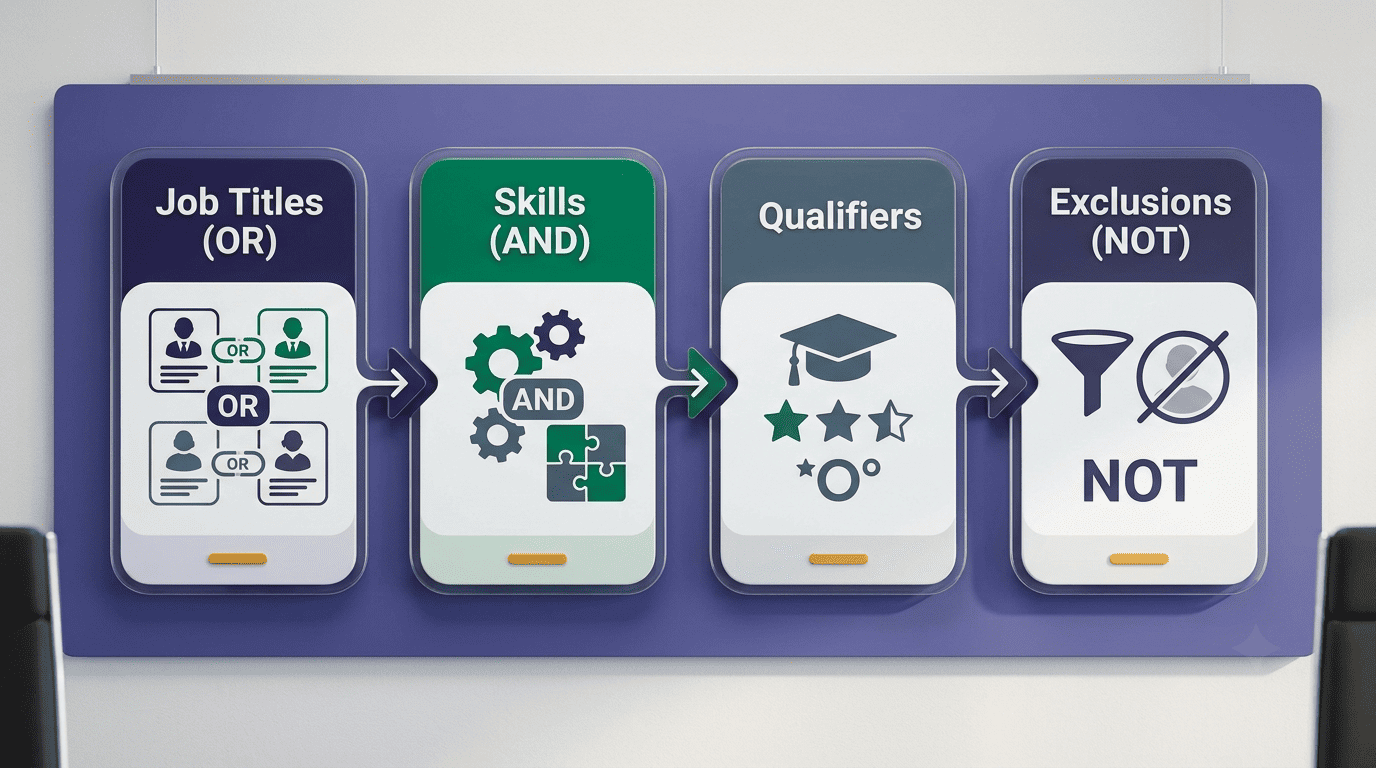
- List core job titles and join them with OR inside parentheses, e.g. (“software engineer” OR “developer”).
- Add must-have skills joined with AND, e.g. AND (Python AND AWS).
- Layer in nice-to-have qualifiers — certifications, tools, methodologies — joined with OR.
- Add exclusions with NOT to remove noise, e.g. NOT (intern OR recruiter).
- Combine the pieces into one string and run a test search.
- Review the first page of results and tighten exclusions if too much noise appears.
- Save the string for reuse and adjust it per role as needed.
The 4-part framework
A full example built from the framework above: (“software engineer” OR “developer”) AND (Python AND AWS) NOT (intern OR recruiter). Each part does a specific job — titles widen the pool, must-have skills narrow it, qualifiers add nuance, and exclusions clean up the noise.
Keep it lean
Keep strings under roughly 200-300 characters. Very long strings — 500 or more characters — can time out or hit platform character caps, especially on LinkedIn. Test a string, look at the first page of results, then add exclusions iteratively rather than trying to write the perfect string in one pass.
Ready-to-Use Boolean String Examples by Role
Tech, sales, healthcare, and PM strings
Copy-ready strings adapt quickly to a specific opening. A few starting points:
Software engineer: ("software engineer" OR developer) AND (Python OR Java) AND (AWS OR Azure) NOT (intern OR recruiter)Product manager: ("product manager" OR "product owner") AND (roadmap OR agile) AND SaaSSales: ("account executive" OR "sales manager") AND (SaaS OR B2B) AND ("quota" OR "pipeline")Nurse: ("registered nurse" OR RN) AND (ICU OR "critical care") AND CCRNSwap in the skills, tools, or certifications specific to the role, and add a NOT clause once you see which unrelated titles keep surfacing.
Platform Differences: LinkedIn, Google X-Ray, Indeed, GitHub
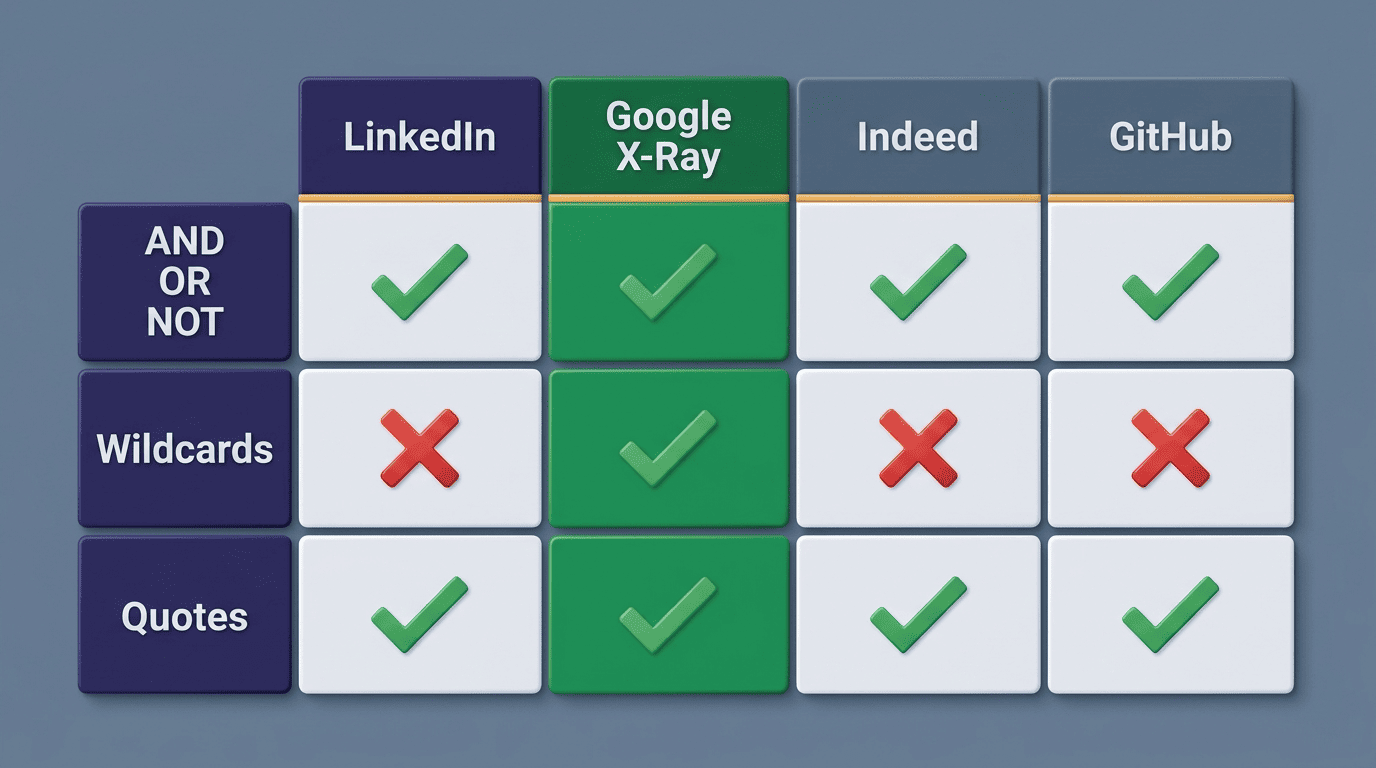
Boolean syntax isn’t universal — each sourcing surface enforces its own rules, and a string that works perfectly on one platform can silently fail on another.
| Platform | AND/OR/NOT | Wildcards | Quotes/Parentheses | Notable limit |
|---|---|---|---|---|
| LinkedIn Recruiter | UPPERCASE only | Not supported | Supported | ~2,000 characters |
| Google X-Ray | Supported | Supported | Supported | Depends on query length |
| Indeed | Supported (NOT inconsistent) | Limited | Supported | Platform-dependent |
| GitHub | Supported, plus location:/language: | Not standard | Supported | Qualifier-based, not char-capped |
LinkedIn Recruiter quirks
On LinkedIn, operators must be written in UPPERCASE — lowercase “and” or “or” is treated as plain text, not logic. LinkedIn does not support wildcards, square brackets, plus signs, or minus signs, and caps strings at roughly 2,000 characters. Precedence follows a fixed order: quotes, then parentheses, then NOT, then AND, then OR. A free LinkedIn account caps visible search results at around 1,000 (100 pages of 10), while LinkedIn Recruiter surfaces a larger candidate pool per search. LinkedIn’s own help documentation covers the exact supported syntax.
Google X-Ray, Indeed, GitHub, Dice
Each of these platforms adds its own search qualifiers on top of standard boolean logic:
- Google X-Ray — uses site:linkedin.com/in to surface public LinkedIn profiles outside LinkedIn’s own result caps, effectively searching the platform from the outside.
- GitHub — adds developer-specific qualifiers such as location:, language:, and followers:, letting a recruiter filter by repo activity as well as keywords.
- Indeed — supports AND/OR/NOT, but the NOT operator behaves inconsistently across searches, so exclusions there need extra testing.
- Dice — a tech-focused job board with a database of 10 million-plus tech professionals, of whom about 3.7 million are searchable in its candidate database — useful context for a niche technical search.
How an AI Recruiter Generates Boolean Strings From a Job Description
Paste a JD, get a string
Modern AI recruiters parse a pasted job description, extract job titles, required skills, seniority level, and location, then assemble a boolean string automatically. hireEZ, for example, offers a “JD mode” where a recruiter pastes the full job description and the AI extracts the relevant keywords, plus a “Quick mode” where a recruiter picks a title and the AI predicts likely keywords. Tools like an AI recruiting assistant turn plain-language requests into structured strings, and can hand the resulting candidate list off to automated candidate outreach once sourcing is done.
AI adoption and the human-in-the-loop
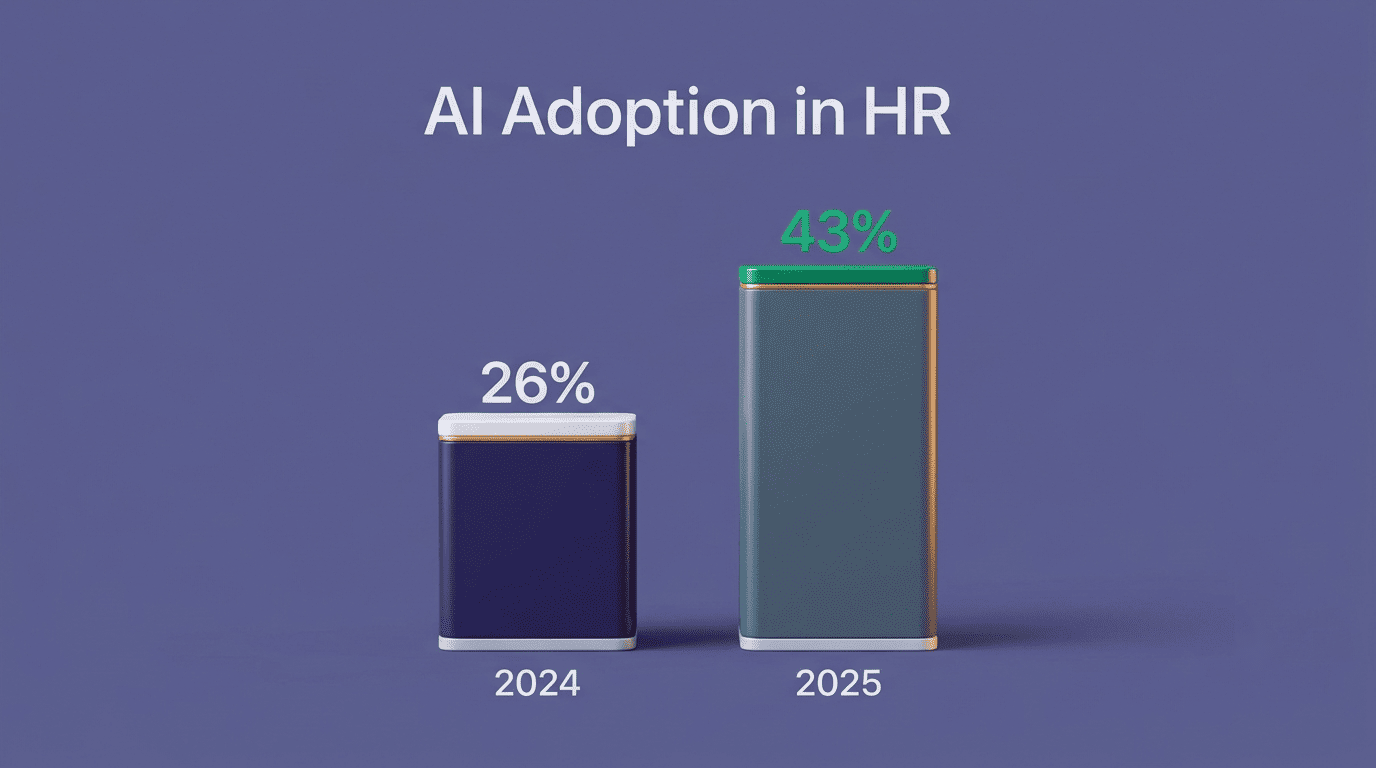
AI adoption in sourcing has risen sharply — from around 26% to 43% of organizations using AI in HR tasks in 2025, according to SHRM’s Talent Trends report, with recruiting cited as the leading use case. That growth makes one caveat more important, not less: AI assists; a human makes the final hiring decision and checks for bias/EEOC. Automated matching can encode bias from historical hiring data, so every AI-generated shortlist still needs a human audit before it moves forward.
SHRM’s own research team makes the same point after tracking that adoption curve.
While AI can quickly surface qualified applicants, human intelligence remains indispensable for interpreting cultural fit, assessing soft skills, and mitigating bias.
SHRM, 2025 Talent Trends report
Separately, the U.S. Equal Employment Opportunity Commission has confirmed that existing anti-discrimination law applies to AI-driven employment tools the same way it applies to any other selection procedure — automated matching does not remove an employer’s legal responsibility for discriminatory outcomes. Recruiters who treat an AI-drafted boolean string as a first pass, not a final answer, keep that responsibility where it belongs.
Common Boolean Search Mistakes to Avoid
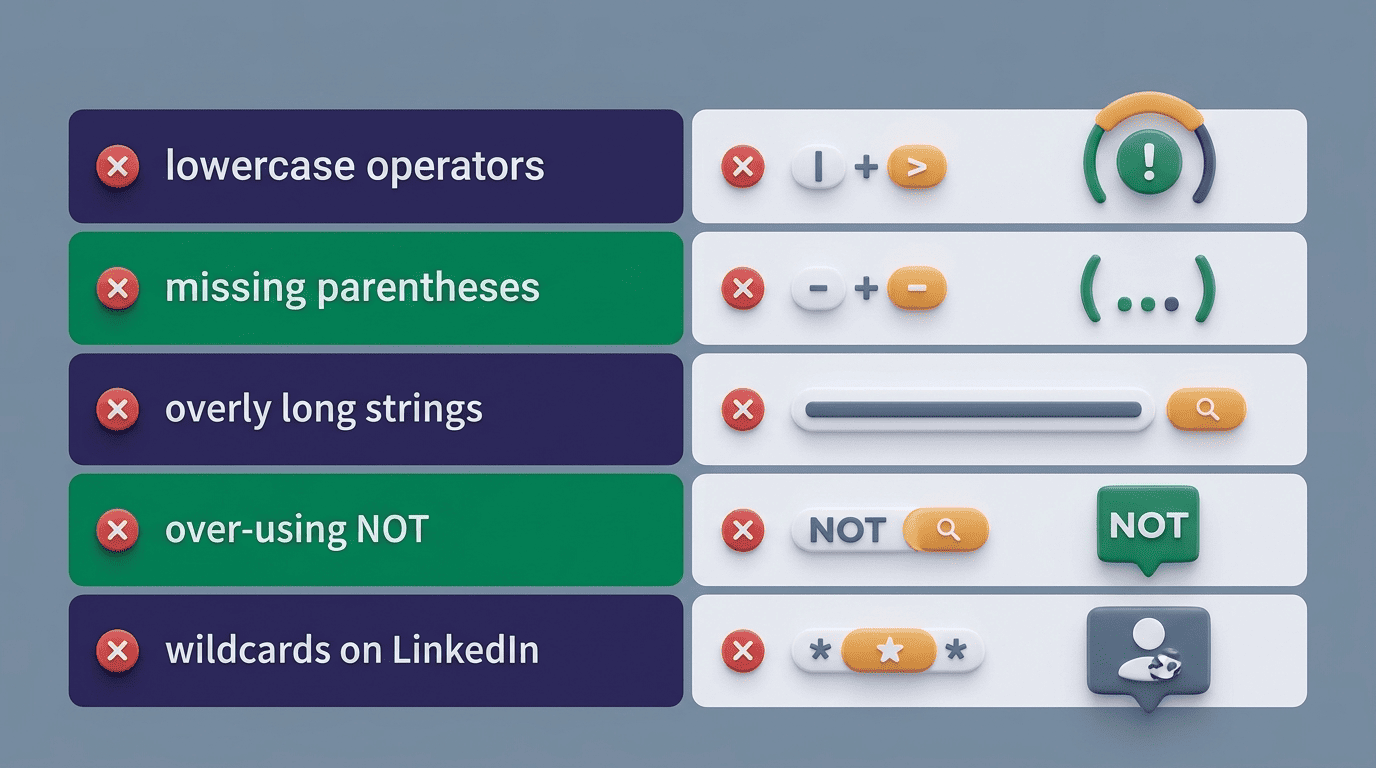
The five most common errors
- Lowercase operators on LinkedIn — the platform reads lowercase “and”/”or”/”not” as plain text, not logic, so the search silently breaks.
- Missing parentheses around OR groups, which flips precedence and returns the wrong candidate pool entirely.
- Overly long strings that hit character caps or time out mid-search.
- Over-aggressive NOT clauses that quietly filter out strong candidates along with the noise.
- Using wildcards on platforms — like LinkedIn — that don’t support them, so the asterisk is read literally instead of expanding.
Boolean Strings vs AI Prompts: What’s Next
Hybrid future, not replacement
Instead of writing a string by hand, a recruiter can increasingly type a plain-language request — “find fintech Python engineers with ML experience” — and let AI interpret the intent behind it. But boolean logic isn’t disappearing; the emerging model is hybrid, spanning three forms:
- Enhanced Boolean Queries — AI suggests or corrects boolean syntax, but a recruiter still reviews and edits it before running the search.
- Layered Searches — AI drafts a first-pass string, then a recruiter manually refines it across several search passes.
- AI-Powered Boolean — AI generates the full string directly from a natural-language request, with no manual syntax involved.
The practical takeaway is to use AI for speed and first drafts, and boolean for precise control — for example when sourcing on AI recruiting software for LinkedIn.