
AI Recruiter for LinkedIn: How to Source, Screen, and Reach Candidates Faster
An AI recruiter is software that helps you source, screen, and message candidates on LinkedIn in a fraction of the usual time, and this guide shows exactly how to put one to work. It sits alongside LinkedIn Recruiter rather than replacing it — think of it as an AI recruiting assistant that handles the repetitive first pass so you can focus on the conversations that actually close roles.
LinkedIn’s own research found that only 27% of recruiters actively use generative AI even though 62% say they’re optimistic about it — the gap is knowing exactly where it helps. This guide walks through AI-Assisted Search, AI-drafted outreach, and AI screening, plus the fairness guardrails that keep a human in charge of every hire.
What an AI Recruiter Actually Does on LinkedIn
Sourcing, screening, and outreach in one assistant
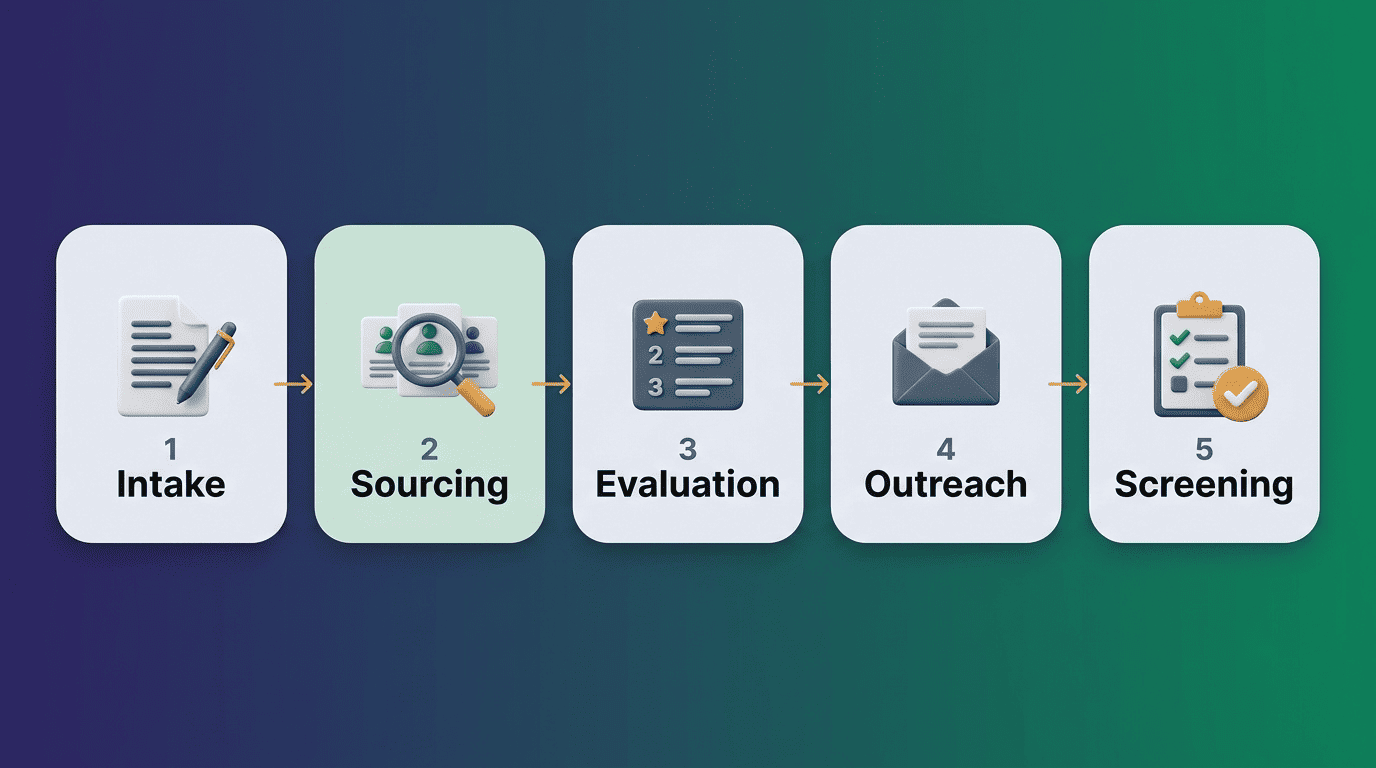
An AI recruiting assistant sits on top of LinkedIn’s network of more than a billion members — what LinkedIn calls its Economic Graph. It runs searches, ranks candidates against your criteria, drafts outreach, and pre-screens replies. LinkedIn’s own Hiring Assistant, announced on October 29, 2024, as the company’s first AI agent for recruiters and sold as an add-on to LinkedIn Recruiter, is built as a supervisor agent that coordinates sub-agents across the hiring workflow:
- Intake — turns scrappy notes and a job description into structured search criteria
- Sourcing — searches LinkedIn’s member base for matching profiles
- Evaluation — ranks and scores candidates against the role’s must-haves
- Outreach — drafts personalized InMail to open a conversation
- Screening — asks qualifying questions once a candidate replies
Within its first year, LinkedIn said charter customers using Hiring Assistant reviewed 62% fewer profiles and saved more than four hours per role — time that goes back into interviewing and closing, not scrolling search results.
It assists — it does not decide
The AI drafts and surfaces candidates; a recruiter reviews and decides. That division of labor is the whole point, and LinkedIn’s VP of Product, Hari Srinivasan, put it plainly when the tool launched.
It’s designed to take on a recruiter’s most repetitive task so they can spend more time on the most impactful part of their jobs.
Hari Srinivasan, VP of Product, LinkedIn
Every AI action inside LinkedIn Recruiter is logged, so a hiring manager or compliance reviewer can trace exactly what the assistant searched, drafted, or asked — the same audit trail you’d expect from a human recruiter’s notes.
AI-Assisted Search vs. Boolean and X-Ray Search
From Boolean strings to plain-English prompts
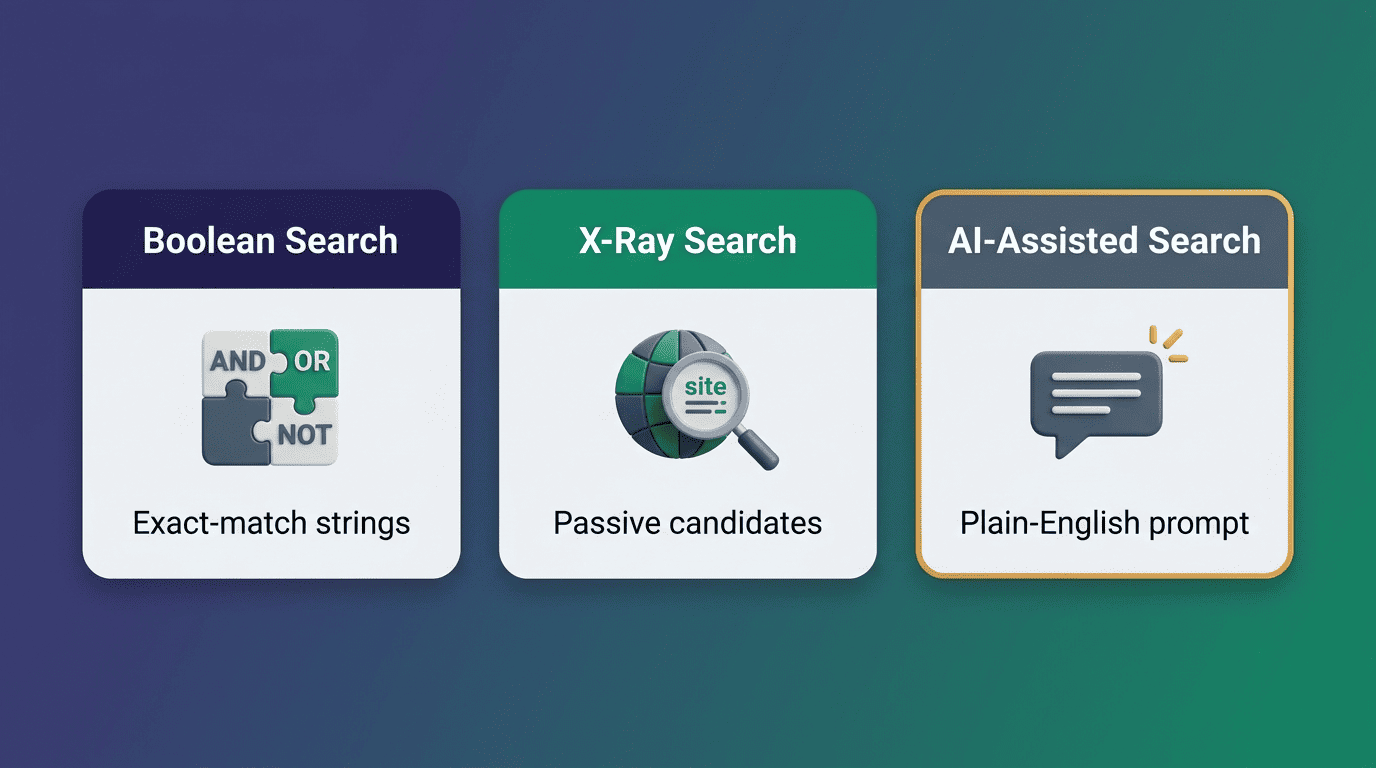
Traditional LinkedIn sourcing means Boolean operators (AND/OR/NOT) or X-ray search through Google to reach profiles a basic search misses. AI-Assisted Search replaces the string-building with a plain-English prompt you refine by conversation instead of memorizing dozens of filter combinations. According to LinkedIn’s Recruiter help documentation on AI-Assisted Search, recruiters using AI-Assisted Search can find and engage a relevant candidate in under five minutes.
A prompt-based search typically replaces several separate steps at once:
- Translating a job description into search-ready keywords and synonyms
- Building and testing a Boolean string across title, skills, and location fields
- Re-running the search after every tweak to the criteria
- Manually skimming dozens of profiles to find who’s actually relevant
| Method | How you search | Best for |
|---|---|---|
| Boolean search | Operators like AND, OR, NOT strung into a query | Precise, exact-match sourcing and compliance-sensitive roles |
| X-ray search | Site-restricted Google queries reaching profiles outside your search index | Passive candidates and niche technical titles |
| AI-Assisted Search | Natural-language prompt, refined by follow-up questions | Broad or fuzzy briefs, first-pass long lists, fast time-to-candidate |
When Boolean still wins
AI-Assisted Search is fastest for broad, fuzzy briefs where you’re still defining the ideal profile. Precise Boolean and X-ray search still earn their keep for niche titles, licensure requirements, and exact-match compliance sourcing where a natural-language prompt can be too loose. The practical pattern most teams settle into: start broad with an AI prompt, then tighten the shortlist with Boolean filters — our Boolean search guide for AI recruiters walks through exactly when to switch.
AI-Assisted Candidate Outreach and InMail
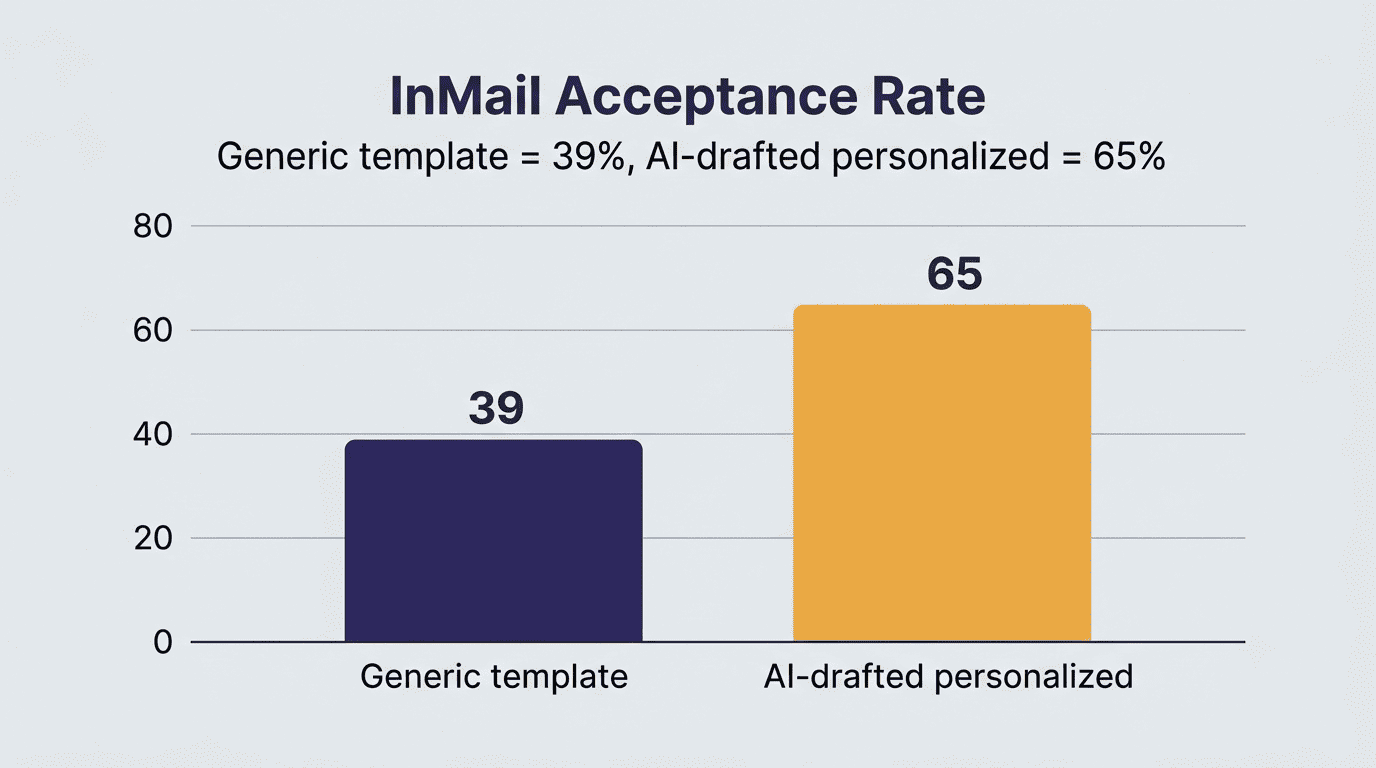
Personalized messages at scale. AI drafts InMail tailored to each candidate’s profile and recent activity, and you edit the draft before it goes out. LinkedIn reports that personalized AI-assisted InMail lifts acceptance rates by roughly 40% compared with generic templates, and AI-Assisted Messages with Touch-Ups push that further. Hiring Assistant customers have reported even larger swings — one staffing firm went from a 39% to a 65% acceptance rate after switching to AI-drafted, recruiter-edited outreach.
| Outreach approach | Reported InMail acceptance lift |
|---|---|
| Generic template InMail | Baseline |
| Personalized AI-assisted InMail | ~40% higher acceptance |
| AI-Assisted Messages + Touch-Ups | ~55% higher acceptance |
| Hiring Assistant (reported customer case) | 39% → 65% acceptance |
A LinkedIn Recruiter seat typically comes with a monthly InMail allotment in the range of 100–150 messages, so personalization matters more than volume — a full guide to sequencing and personalizing that outreach lives in our AI-assisted candidate outreach playbook.
Keep it human. Generic AI blasts get ignored fast and can quietly damage your employer brand. Add one specific detail from the candidate’s background, verify any fact the AI pulled from their profile, and never mass-send a batch of unreviewed drafts — that’s also how you stay inside LinkedIn’s messaging limits and terms of service.
AI Screening and Prescreening Candidates
AI ranks applicants from LinkedIn and your ATS against the role’s must-have skills, then surfaces a shortlist with the evidence behind each match — the specific experience, certification, or keyword that earned a candidate their spot. Broader HR survey data shows AI-assisted screening is now mainstream rather than experimental, and teams that adopt it report screening time dropping by as much as 75%, with one benchmark going from three hours of resume review down to about 30 seconds of AI triage before a human check.

LinkedIn’s Hiring Assistant can automatically send customizable screening questions once a candidate replies to an initial outreach message, so a recruiter’s phone screens go only to people who’ve already cleared the basic qualification bar. That single step is often what turns a promising InMail reply into a genuinely qualified shortlist instead of another round of unscreened calls.
A shortlist worth trusting usually has a few things in common:
- Each candidate is matched against explicit must-have skills, not just keyword overlap
- The match comes with visible evidence — the specific experience or credential behind the score
- Screening questions are tailored to the role, not a generic template
- A recruiter still spot-checks the AI’s ranking before booking phone screens
Fairness, Bias, and Keeping a Human in the Loop
The disclaimer that protects you
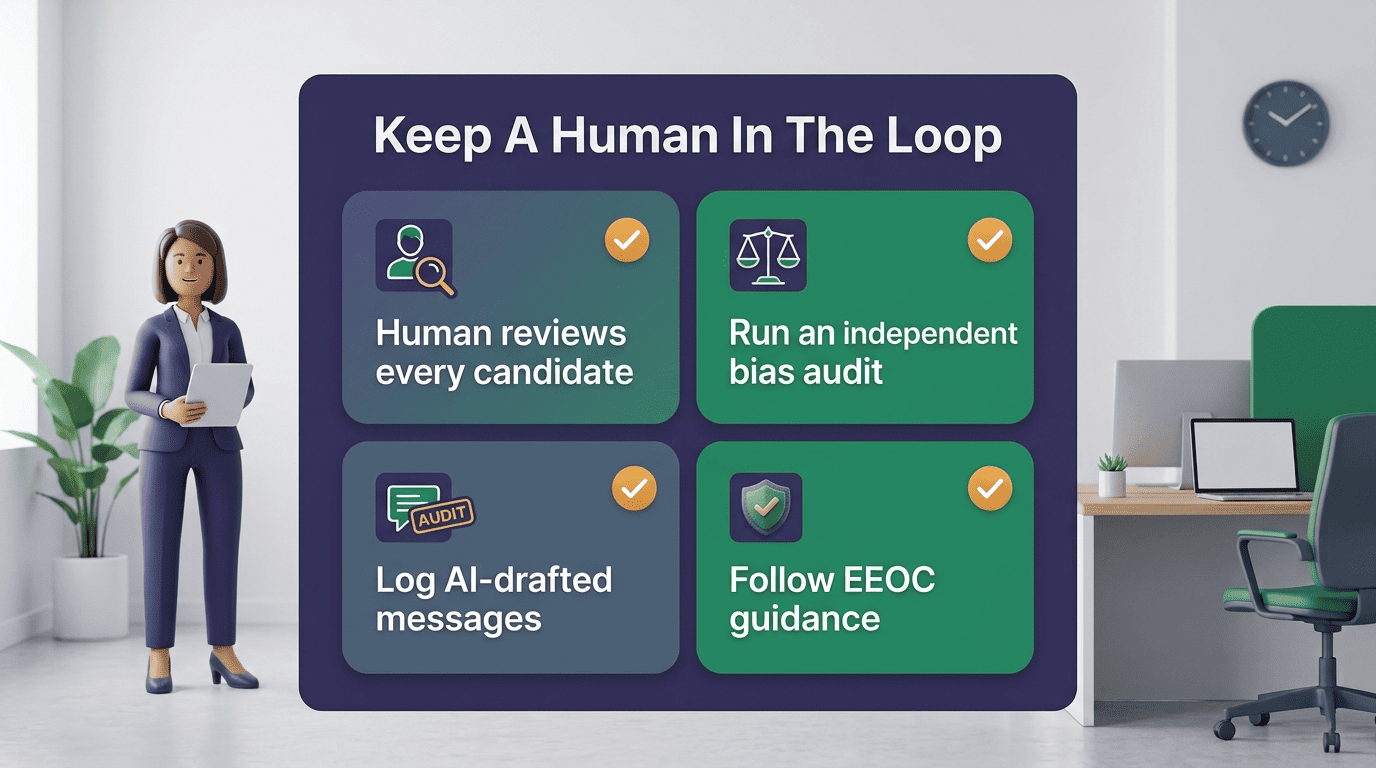
An AI recruiter assists with sourcing and messaging; a human must still review candidates, check the shortlist for bias, and make the final hiring decision. Source fairly, avoid using proxies for protected traits in your search criteria, and keep every step defensible under EEOC guidance and local rules such as New York City’s Local Law 144, which requires employers to run independent bias audits of automated employment decision tools before using them in hiring. According to SHRM’s 2025 Talent Trends research, recruiting is one of the most common places HR teams apply AI, with a majority of HR professionals now using it somewhere in the hiring process — which is exactly why governance around that AI use matters as much as the AI itself.
Respect the platform
- Use LinkedIn’s built-in AI features and approved partners rather than third-party scrapers
- Keep a recruiter in the loop for every candidate-facing decision, not just the final offer
- Log and review AI-drafted messages before they’re sent, especially for sensitive roles
- Publish bias-audit results where local law requires it, and update them on schedule
Automated scraping outside LinkedIn’s own tools violates the platform’s terms of service and risks your account standing and the quality of the data you’re working from. For a broader look at how AI is reshaping recruitment ethics and oversight, Wikipedia’s overview of artificial intelligence in hiring is a useful primer on the debate.
How a Recruiter Uses an AI Recruiter, Step by Step
Most recruiters who adopt an AI recruiter settle into a version of the same five-step day-one workflow within their first few searches:
- Draft the job description and intake criteria with a generative-AI prompt — LinkedIn survey data puts faster job descriptions as the single benefit recruiters cite most often.
- Run an AI-Assisted Search in plain English, describing the role the way you’d explain it to a colleague.
- Refine the results by conversation — narrow by seniority, location, or must-have skill instead of rebuilding a Boolean string.
- Review the ranked shortlist and the skill-match evidence behind each candidate before reaching out.
- Send AI-drafted, recruiter-edited InMail, then let the AI prescreen replies while you focus on interviews and the final decision.
That loop is what LinkedIn’s own AI-Assisted Search documentation describes as searching once and refining through follow-up questions rather than rebuilding a query from scratch each time.