
How to Use an AI Recruiter to Write Job Descriptions (Fast, Inclusive, Compliant)
Writing a job description from scratch can eat 30 minutes or more per role. An AI recruiter drafts a complete, structured posting — overview, responsibilities, qualifications — in seconds, and according to the U.S. Equal Employment Opportunity Commission, employers stay legally responsible for what that posting says once it’s published.

This guide walks through the actual workflow: how to prompt an AI recruiting assistant, what a full job description needs to contain, how to catch biased language before it costs you applicants, and why a human still has to sign off before anything goes live. AI job description tools cut drafting time by roughly 40%, but speed only helps if the output is accurate and compliant.
Can an AI Recruiter Really Write a Job Description?
Yes, in the sense that matters for a first draft. An AI recruiting assistant is built on large language models trained on millions of existing job postings, so it already knows the standard shape of a job description — it just needs a job title and a handful of details to fill in the blanks. Most tools return a draft in under 10 seconds, and survey data shows around 89% of HR professionals whose organization uses AI in recruiting say it saves them time or increases efficiency.
What an AI recruiter does under the hood
An AI recruiting software tool combines a large language model with natural language processing trained on huge volumes of job postings. Feed it a job title and a few details, and it assembles a structured draft — overview, responsibilities, qualifications, and skills — using patterns pulled from thousands of comparable roles. Workable’s generator, for instance, draws on more than 1,000 templates and can produce a draft in three tones (generic, formal, or friendly) in seconds. The mechanics resemble how natural language processing works more broadly: the model predicts the most plausible next phrase given everything that came before it, not the objectively “correct” one.
Where it saves the most time
The time savings are the main reason recruiting teams adopted these tools in the first place. Estimates put the reduction in job-description writing time at around 40%, and separate surveys report that 57% of recruiters say AI speeds up JD writing specifically, while 67% say it saves time on recruiting tasks overall. That freed-up time typically goes toward sourcing, interviewing, and other work that still requires a human’s judgment — the AI recruiter handles the repetitive first draft, not the decisions around it.
A Step-by-Step Workflow: From Job Title to Posting
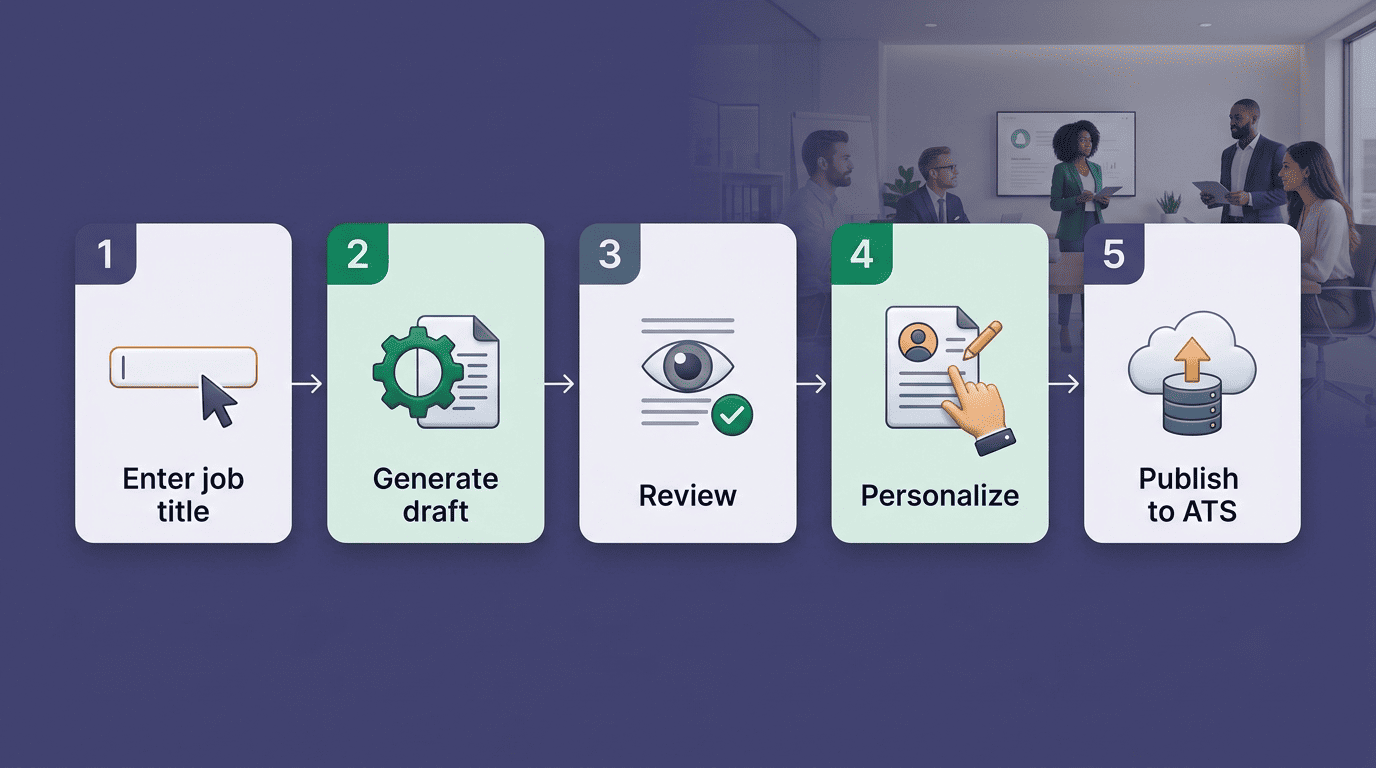
Most AI recruiting assistants follow the same basic sequence, whether they’re a standalone tool or built into a broader AI recruiting platform. Here’s the process broken into concrete steps.
- Enter the job title, industry, and department. This is the minimum an AI job description generator needs to start.
- Add seniority level and must-have skills. The more specific the inputs, the less generic the output.
- Generate the draft. Expect an overview, a responsibilities list, and a qualifications section within seconds.
- Review for accuracy and tone. Check that the draft actually reflects the role, not a generic template.
- Personalize with company details. Add company name, tech stack, salary range, and benefits.
- Run a bias and compliance check. Scan for gendered, ageist, or exclusionary language before anything goes live.
- Publish through your ATS. Push the finished posting to job boards and your applicant tracking system.
Step 1 — Give the AI the essentials
Start with the job title, industry or department, seniority level, and must-have skills. Factorial’s guidance on prompting ChatGPT for recruiting describes this as a “5-point job description”: the role itself, its core responsibilities, requirements, the attributes of an ideal candidate, and what makes the position worth applying to. The tighter these inputs, the less editing the draft will need later.
Step 2 — Generate and review the draft
The AI recruiter returns an overview, a responsibilities section, required qualifications, and often a “preferred skills” list. Read it the way you’d read a draft from a junior team member — assume it needs a pass, not that it’s finished. Once candidates are selected against this posting, the next step in the hiring pipeline is resume screening, which works from the same job description to shortlist applicants.
Step 3 — Personalize and publish
Add the company name, actual tech stack, salary range, and benefits before publishing. Pay transparency isn’t just good practice: SEEK data shows job ads that display a salary see an average 47% increase in applications compared to ads that don’t. Once personalized, publish through your applicant tracking system.
How to Prompt Your AI Recruiter (So the JD Is Actually Good)
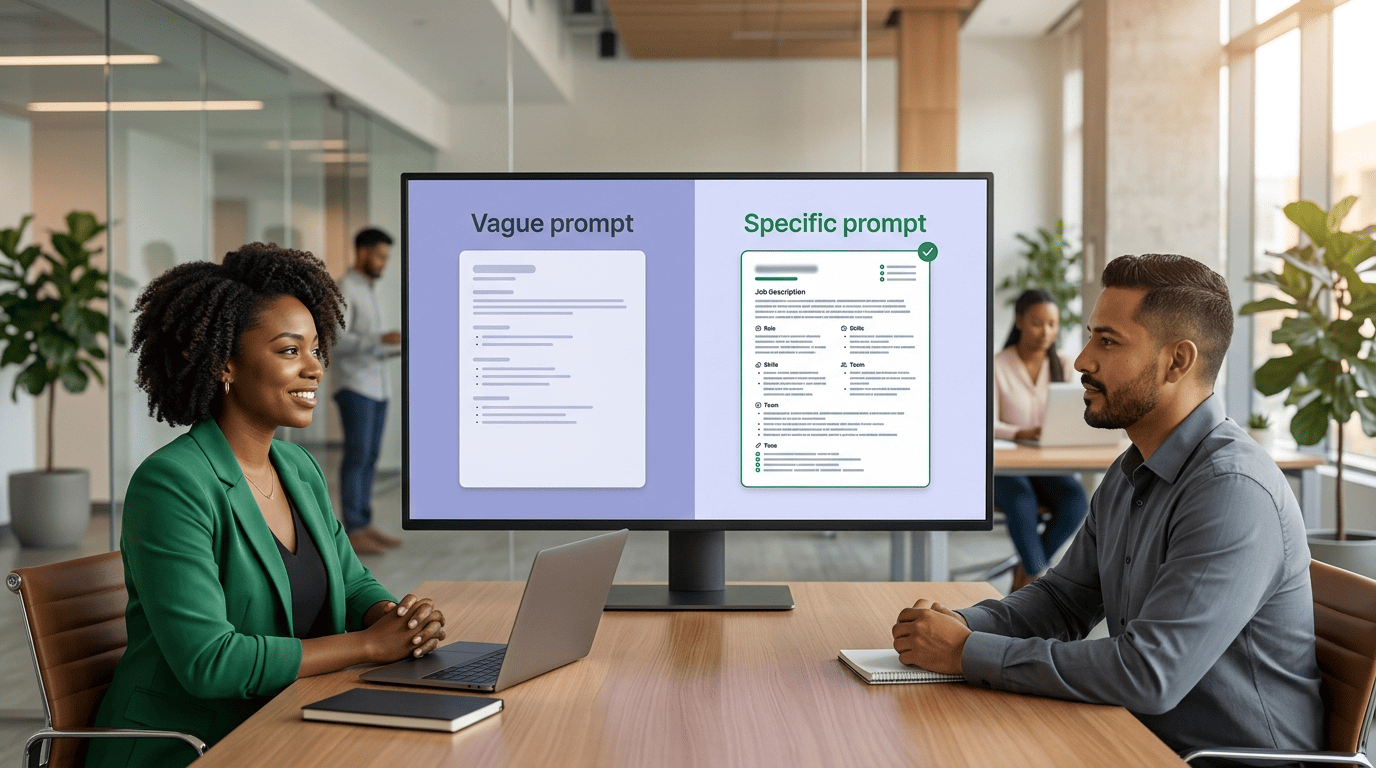
The quality of an AI-generated job description depends almost entirely on the prompt. A vague prompt produces a generic posting that could describe any company; a specific one produces something a candidate can actually picture themselves doing.
Be specific about the role and context. State the exact title, seniority, department, and what makes this particular opening different from a generic listing at another company.
Set a tone. Formal, friendly, or somewhere in between — say so, because the default output tends toward corporate boilerplate.
Include company culture and requirements. Mention what the team actually values and which qualifications are non-negotiable versus nice-to-have.
Cap the length. Seek’s hiring advice recommends keeping job ads between 300-750 words; Recruitee’s data points to 200-300 words as the sweet spot for candidate engagement.
| Length guidance | Source | Notes |
|---|---|---|
| 300-750 words | Seek hiring advice | Recommended range for job ads |
| 200-300 words | Recruitee | Optimal range for candidate engagement |
Anatomy of a strong prompt
A strong prompt for an AI recruiting assistant combines role, context, tone, requirements, and a length limit in one instruction — for example: “Write a formal job description for a mid-level Software Engineer on a 6-person backend team, focused on Python and distributed systems, 250 words, emphasizing our on-call rotation and remote-first culture.” That level of specificity is what separates a usable first draft from something you have to rewrite entirely.
Common prompt mistakes
Three mistakes account for most weak AI-generated drafts:
- Too general a prompt. Just a job title with no other detail produces generic filler that could apply to any company in any industry.
- No company context. Skipping culture, team size, or tech stack produces a posting with no personality, which candidates increasingly notice and skip past.
- No length limit. Leaving the output uncapped tends to produce a bloated draft padded with boilerplate responsibilities that don’t reflect the actual role.
Writing Inclusive, Bias-Aware Job Descriptions
Word choice in a job description directly affects who applies. Gendered or exclusionary language narrows the candidate pool before a single resume comes in, which is why bias detection has become a standard feature in AI recruiting software rather than an optional add-on.
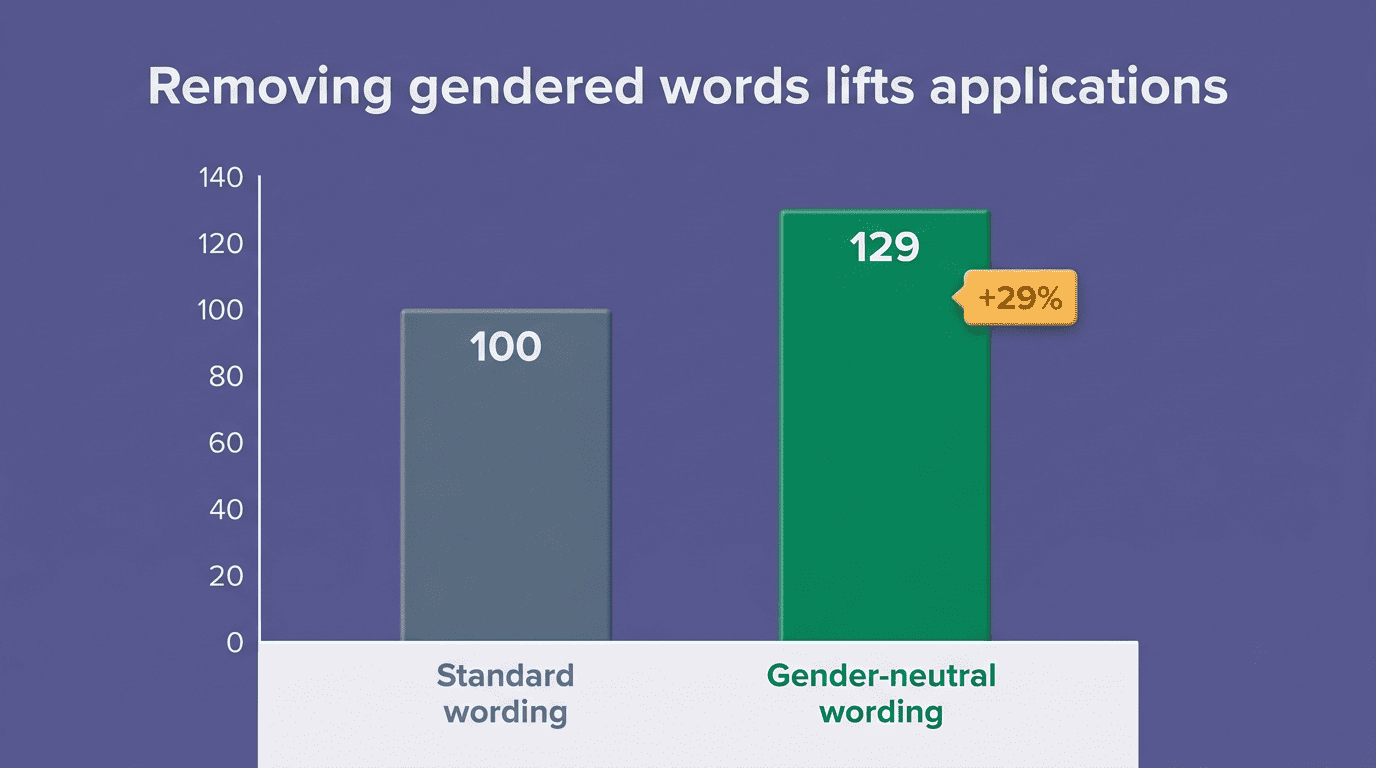
Removing gender-coded words from job postings resulted in a 29% increase in the number of applications received.
Appcast research, cited by Ongig
Why biased language costs you candidates
Words like “rockstar,” “ninja,” “aggressive,” or default use of “he” throughout a posting are gendered enough to measurably shrink the applicant pool — even when nobody intended it that way. Tools built specifically for this, like Ongig’s Text Analyzer, flag more than 12 categories of biased language, from gender-coding to age-related phrasing like “digital native.” Textio and Datapeople offer similar bias-scanning built around the same idea: language that reads as neutral to the writer can read as exclusionary to the candidate.
Let the AI flag exclusionary language — then you judge
An AI recruiter can surface gendered, ageist, or ableist phrasing automatically as part of the drafting process, which is faster than a manual read-through. About 43% of recruiters in one industry survey say AI has helped reduce bias in their hiring process. That’s a meaningful improvement, not a guarantee — the tool flags candidates for concern, but a person still has to decide whether a flagged phrase is actually a problem in context.
The Soft Disclaimer: AI Drafts, Humans Decide
This is the section that matters most if you’re publishing AI-written postings at scale: an AI recruiter is a drafting tool, not a compliance officer, and the two roles shouldn’t be confused.
An AI recruiter drafts — a human must review
An AI recruiter can produce a fast, well-structured first draft, but a human being must review every posting before it goes live — for factual accuracy, for inclusive and bias-aware language, and for compliance with EEOC and other anti-discrimination requirements. This isn’t a formality. OpenAI itself cautions that ChatGPT “sometimes writes plausible-sounding but incorrect or nonsensical answers,” and a job description that sounds professional but misstates a legal requirement or includes subtly exclusionary phrasing can create real liability. Separately, 66% of U.S. adults say they would not apply for a job that uses AI in hiring decisions, which is one more reason the human review step needs to be visible in practice, not just on paper.
Compliance checklist before you publish
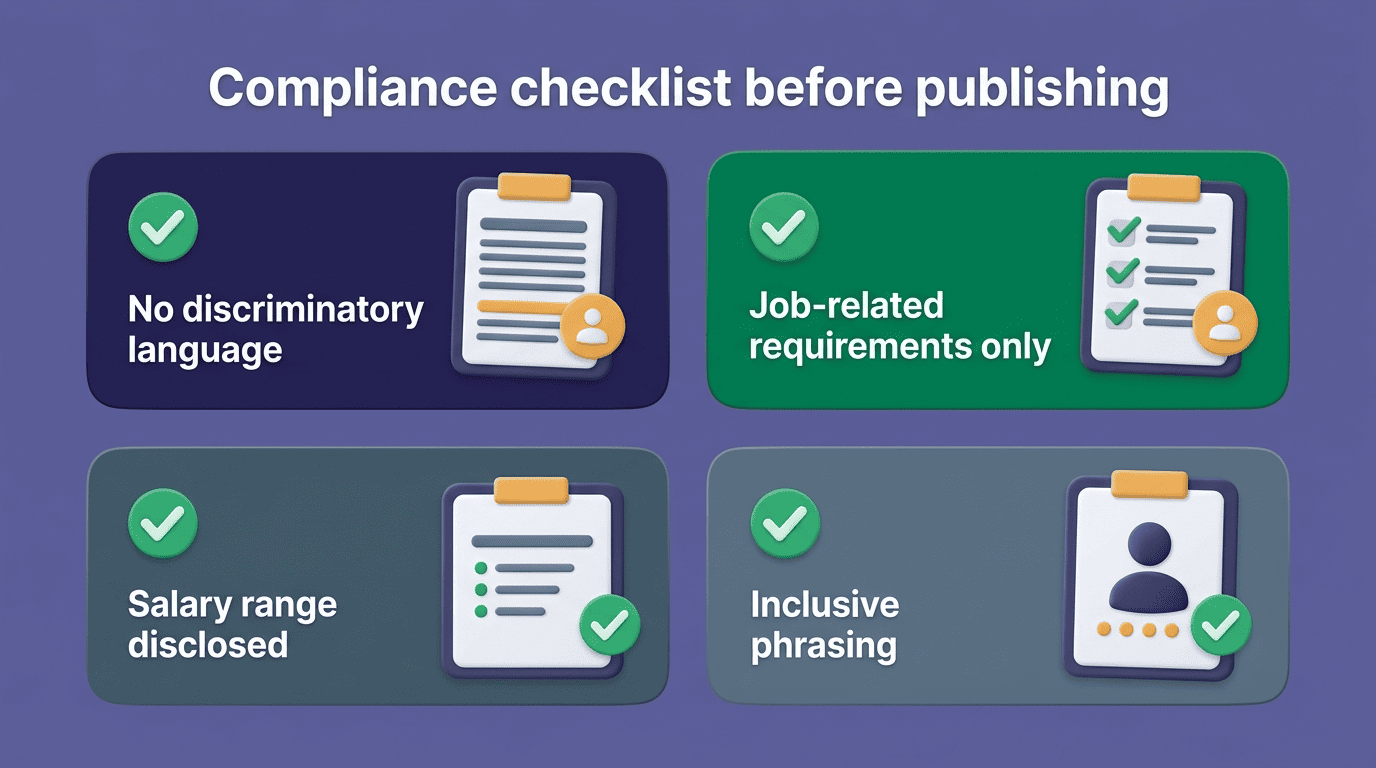
Before a job description goes live, check it against a short list:
- No language that discriminates based on sex, age, race, disability, or religion.
- Every listed requirement is a genuine, job-related qualification rather than an arbitrary filter.
- The salary range is disclosed where local law requires it.
- The phrasing throughout reads as inclusive rather than coded toward one type of candidate.
SHRM’s guide to developing a job description is a solid reference for the structural side of this check. Once a posting clears this list and starts drawing applicants, the next stage of the process is usually interview questions — which carry their own version of the same compliance requirement.
Editing, Publishing, and Connecting to Your ATS
| Stage | What happens | Owner |
|---|---|---|
| Draft generation | AI recruiter produces overview, responsibilities, qualifications | AI tool |
| Compliance review | Bias check, EEOC review, fact check | Human recruiter |
| Personalization | Company name, tech stack, salary, benefits | Human recruiter |
| Publishing | Posting pushed to job boards and ATS | AI recruiting software |
From draft to live posting
Once a draft passes review, the remaining work is mostly branding and distribution: final copy edits, matching the company’s voice, and confirming formatting. Most AI recruiting software integrates directly with applicant tracking systems and major job boards, so a finished posting can go out to multiple channels in a single click rather than requiring separate manual postings on each platform.